<!-- googleoff: index -->
⚠️ v4.0 UI Transition Notice - In Process: The release of Total Launcher v4.0 has introduced significant user interface changes. Please note that this page does not yet reflect these updates. The new layout paths, folds, and visual maps are currently being compiled and will be deployed shortly.
<!-- googleon: index -->
<insert previous page>
Color Picker
Dialog selections are discussed below the image. There is no navigation in the in the Color Picker image. Use the browser's upper left arror or left-to-right swipe on mobile to return to the priopr page.
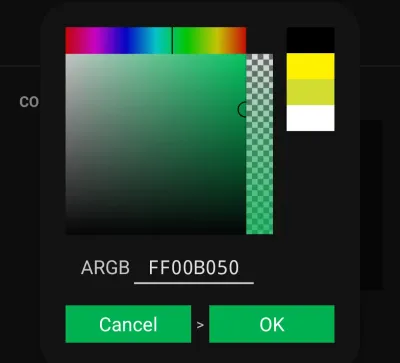
Color Picker dialog
- An explanation of the 7 functional areas:
- Gradient color selection - Gradient-colored box to select the Hue, Saturation and Lightness of the designated ARGB selection in #2
- Red/blue/green levels - Multi-color bar adjusts the red/blue/green levels
- Alpha channel - Vertical bar for the alpha channel ranging from transparent to opaque of the ARGB channel
- Recent colors - 10 section vertical column shows recently used colors for icon, fonts, shapes, backgrounds, etc.
If there is a need to copy a color from any element, go to that element, choose Color and the Color Picker will open. Tap OK and that color will be brought to the top of section (4) for selection at other times.
- Manual hexadecimal input - The input box is the 8 digit hexadecimal representation of the ARGB color code with the 1st 2 digits for the alpha channel and the last 6 digits for the RGB. The value can be input directly or results from manipulation of areas 1-4.
- Previous color - represents the previous color
- Activate designated color - The current color to be set when OK is selected
===== Hidden Index Anchors ===== ID1|Cancel - USE BROWSER L-TO-R SWIPE or LEFT SIDEBAR VISIT PAGES TO RETURN TO THE PRIOR PAGE@59,297,198,350 ID2|OK - USE BROWSER L-TO-R SWIPE or LEFT SIDEBAR VISIT PAGES TO RETURN TO THE PRIOR PAGE@204,297,342,351 { } cfg
Comments & Feedback
Toby Lancer is ready to help! Look for the Quick Help form:
► Desktop: left sidebar located near the bottom for Private to Admin
► Mobile: 3-bar menu at page top.
► Use the Discussion section below to share any experiences and communications with other Total Launcher users.
► Any Registered User can directly update this and any wiki page if desired.
Moderation: To keep the manual clean, all comments are held for appropriateness review. Preview any comment before submitting it. It will not be displayed after submission until it is reviewed. So, please, do not resubmit.
Formatting: If using any code snippets, place them inside code tags (e.g., 'code') using double single quotes (') before and after to keep them readable.
Be Kind: This is a community effort. Please keep feedback constructive and on topic.
~~DISCUSSION~~