<!-- googleoff: index -->
⚠️ v4.0 UI Transition Notice - In Process: The release of Total Launcher v4.0 has introduced significant user interface changes. Please note that this page does not yet reflect these updates. The new layout paths, folds, and visual maps are currently being compiled and will be deployed shortly.
<!-- googleon: index -->
Design Menu
Dialog selections are discussed below the image. For navigation to an item make a selection in the Design Menu image.
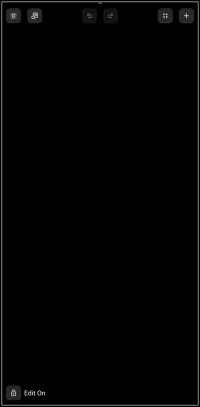
Design Menu dialog. Make selection above.
- Select - [Not selectable in this demo] Selects and highlights an object. Can the be dragged by a stylus, mouse, or digit:
- Right-to-Left - selects objects partially within the boundary and objects fully with the boundary
- Left-to-Right - selects objects fully within the boundary only
- Scale or Move - [Not selectable in this demo] Allows for the vertical or horizontal movement and scaling of all objects simultaneously. If an object is “pinned” to the page this dialog will require the action to specify
Objects on this pageorPinned objects, making the action independent. * Undo or Redo - [Not selectable in this demo] Reverts the page to it's previous object state (not individual editing steps of an object) - Page margins - allows adjustment of the margins of the current screen.
- Object add - opens the Object Add menu for selecting layouts, widgets, and graphics for object creation.
- Edit On - [Not selectable in this demo] In the app tapping this icon would cause the edit mode to terminate and the user is returned to launcher page.

<insert toby says>
===== Hidden Index Anchors ===== ID1|Selection@5,8,25,27 ID2|Scale or Move@24,8,47,27 ID3|Undo (back) or Re-do (forward)@82,9,115,24 ID4|Page margins@153,7,178,26 ID5|Object add@176,7,198,28 ID6|Edit to off@4,380,48,402 { } cfg
Comments & Feedback
Toby Lancer is ready to help! Look for the Quick Help form:
► Desktop: left sidebar located near the bottom for Private to Admin
► Mobile: 3-bar menu at page top.
► Use the Discussion section below to share any experiences and communications with other Total Launcher users.
► Any Registered User can directly update this and any wiki page if desired.
Moderation: To keep the manual clean, all comments are held for appropriateness review. Preview any comment before submitting it. It will not be displayed after submission until it is reviewed. So, please, do not resubmit.
Formatting: If using any code snippets, place them inside code tags (e.g., 'code') using double single quotes (') before and after to keep them readable.
Be Kind: This is a community effort. Please keep feedback constructive and on topic.
~~DISCUSSION~~